

Provided for information only. Not to be used without a licence granted by Good On You.
Introduction
This documentation is for v3.0 of Good On You's Ratings REST API. The URLs listed in this documentation are relative to the base URL: https://api.brandlist.goodonyou.eco/.
Other relevant resources before you get started:
Authentication, access & quotas
Your application must have authorisation credentials to be able to use the Brand Listing API. Your API key identifies your project and provides API access.
API key management
API keys are self-managed via the account portal. To access the account portal click "Account" in the ratings dashboard sidebar and "API Keys" in the account portal top navigation, or go directly to https://b2b-auth.goodonyou.eco/user/api-tokens.
Creating & Managing Keys: Users can create, view, and delete API keys directly within the account portal.
Role Permissions: Account owners can view API keys and usage data generated by any team member. Non-owner team members can only view their own keys and usage. Learn how to manage your team accounts.
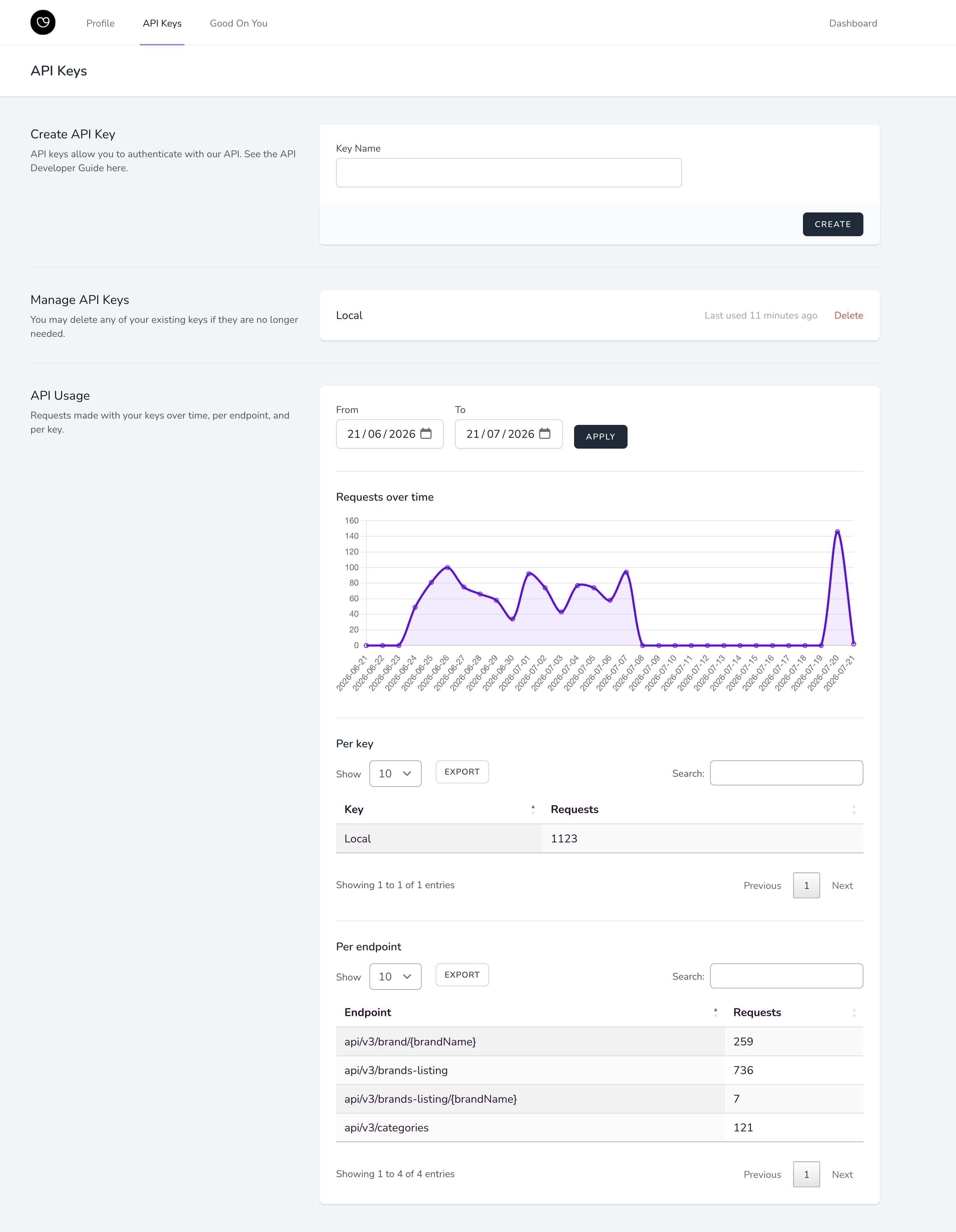
Monitoring API usage
The self-serve portal provides real-time monitoring and historical reporting for your API consumption:
Requests Over Time: Filterable visual trend graph of API call volume by date range.
Per Key: Breakdown of total request volume per generated API key.
Per Endpoint: Detailed metrics showing call volume per individual API endpoint.
Request header
Include your API key in all HTTP requests via the X-API-KEY header:
JavaScriptContent-Type: application/json
X-API-KEY: your_api_key_here
Rate limits
All endpoints are limited to 60 requests per minute. The API is designed to serve backend data integration and not consumer-facing dynamic requests. Read more about data update frequency or reach out to your account manager to get support on designing integration solutions.
Endpoints
1. Brand Listing
Returns data for all subscribed Good On You brand rating records. Partners can subscribe to one or more rating verticals (e.g. fashion, beauty). Rating records will be returned for only the verticals the account is subscribed to.
GET {API_SERVER}/v3/brands-listing
API_SERVER: https://api.brandlist.goodonyou.eco/
REQUEST
Headers:
Content-Type: application/json
X-API-KEY: (As provided)
Query parameters:
limit: The maximum number of brands to return per page. Example: 10, Default: 100
skip: The offset of the brand at which to begin the response. Example: 100, Default: 0
Filters:
vertical: Return all records within one vertical. vertical=fashion is applied by default. vertical=beauty and vertical=beauty available only for subscribed accounts.
Example: https://api.brandlist.goodonyou.eco/v3/brands-listing?vertical=beautylastRated: Return all rating records that were rated within a defined time period. Uses lte (less than or equal to) and gte (greater than or equal to) parameters. Users can use either one or both.
https://api.brandlist.goodonyou.eco/v3/brands-listing?lastRated[gte]=2023-01-01&lastRated[lte]=2024-04-01
Example:
markupcurl --request GET 'https://api.brandlist.goodonyou.eco/v3/brands-listing?limit=100&skip=500' \--header 'X-API-Key: <INSERT API KEY>'--header 'Content-Type: application/json'
RESPONSE
total (integer): The total number of listed brands
limit (integer): The limit that was used for these entries. This will be the same as the limit query parameter unless that value exceeds the maximum value allowed. The maximum value is 100.
skip (integer): The 0-based offset of the first entry in this set. This will be the same as the skip query parameter.
data (array): An array of brands data, sorted by brands’ names
name (string): Brand’s name.
Example: “Denham”brandId (integer): an immutable, unique ID number attached to the brand entity (a brand entity can have multiple ratings in different verticals e.g. DIOR has both a fashion and beauty rating).
website (string): Brand’s website.
Example: “https://www.denhamthejeanmaker.com/en/home/”size (string): Brand’s size considering turnover, number of employees, digital signals, being a parent/subsidiary company, etc. Value is either “small” or “large”.
headquarters (string): Name of the country where the brand's headquarters is located. ISO3166 country names are used.
Example: “Netherlands”shipsTo (array of strings): List of countries or regions where the brand ships. ISO 3166-1 two-letter country abbreviations, "ALL", "EU", or "UK".
vertical: Indicates the vertical methodology that the rating is produced within.
Example: ["fashion"] or ["beauty"].categories (array of strings): An array of product categories the brand sells within the rating vertical. Possible values are:
Fashion: “Accessories”, “Activewear”, “Bags”, “Basics & Intimates”, “Bottoms”, “Denim”, “Dresses & Playsuits”, “Jewellery & Watches”, “Maternity”, “Outerwear”, “Shoes”, “Sleepwear”, “Sweaters & Knitwears”, “Swimwears”, “Tops”
Beauty: "Face", "Eyes", "Lips", "Nails", "Skincare", "Haircare", "Suncare", "Bath & Body", "Fragrance", "Dental"
Example: [ "Bottoms", "Denim", "Tops" ]
subcategories (array of strings): An array of subcategories that the brand sells within the rating vertical. Subcategories are child to categories. Possible values are:
Fashion: "T-Shirts", "Tops & Blouses", "Polos", "Shirts", "Jumpsuits & Playsuits", "Dresses", "Sneakers", "Slippers & Comfort", "Sneakers", "Flats", "Boots", "Sandals", "Heels", "Casual", "Dressy", "Underwear", "Stockings & Tights", "Socks", "Bodysuits", "Lingerie", "Skirts", "Shorts", "Pants", "Denim", "Outdoorwear", "Activewear", "Sportswear", "Swimwear", "Satchels & Totes", "Backpacks", "Handbags", "Wallets & Purses", "Luggage", "Handbag", "Satchels & Totes", "Wallets & Purses", "Ties", "Belts", "Gloves", "Jewellery", "Hair Accessories", "Scarves", "Watches", "Eyewear", "Hats", "Knitwear", "Sweaters", "Hoodies & Sweatshirts", "Hoodies", "Jumpers", "Coats", "Jackets", "Sports Coats & Blazers", "Jackets & Blazers", "Sports Coats & Blazers", "Sleepwear", "Suits", "Uniforms", "Maternity".
Beauty: "Foundation", "Powder", "Concealer", "Contour & highlight", "Face primer", "Blush & bronzer", "Setting", "BB,CC,DD cream", "Tinted moisturiser", "Mascara", "Eyeshadow", "Eyeliner", "Eyebrow Gel, Pomade & Wax", "Lash & brow treatments", "Lipstick", "Lip gloss", "Lip liner", "Lip Treatments", "Nail polish", "Nail polish remover", "Nail treatments", "Moisturisers", "Face Washes & Cleansers", "Face Scrubs & Exfoliants", "Masks", "Toners & Mists", "Makeup Remover", "Face Serums & Oils", "Face Wipes", "Acne & Blemish", "Face Treatments", "Shampoo & conditioner", "Hair styling", "Hair colouring", "Hair treatments", "Face Sunscreen", "Body Sunscreen", "Tanning", "Aftersun", "Soap & body wash", "Body Scrubs & Exfoliants", "Bath Soaks & Bubble Bath", "Body Lotions & Body Oils", "Hair removal", "Deodorant", "Hand sanitiser", "Intimate care", "Perfume", "Cologne", "Toothpaste", "Mouthwash"
Example: [ "Backpacks", "Jumpers", "Polos" ]
segment (array of strings): The type of apparel the brand sells. Possible values for fashion brands are: “Children”, “Men”, “Women”. Only "Children" is valid for beauty brands.
Example: [“Men”, “Women”]plusSize (boolean): true/false. Defines whether a fashion brand carries body-inclusive sizing. Defined by whether the brand offers XXL (or equivalent) sizing in their primary categories.
price (integer): Brand’s price range indicator denoted by an integer between 1 to 4.
Example: 2contact: An object containing the brand’s contact details including name and email, if known.
Example: { "name": null, "email": "csr@denham.com" }sentence (string|null): Brand’s lead sentence as shown in the Good On You mobile App and web Directory.
summary (string): Brand’s summary explaining their rating, returned in html format.
logo (string|null): Direct URL to the brand's logo image.
cover (string|null): Direct URL to the brand's cover image. Typically only available for ratings 3/5 and up.
parentCompany (string|null): The name of the brand’s parent company if the brand is a subsidiary. A null value indicates the brand does not have a parent company.
Example: null
Example 2: “Kering”values (array of strings): An array of strings indicating the “Values” held by a brand. Possible values are: “Eco-Friendly Materials”, “Fairtrade”, “Give back”, “Organic”, “Recycled / Upcycled Materials”, “Vegan”.
Example: [“Organic”, “Eco-Friendly Materials”]certifications (array of strings): An array of strings indicating the Certifications held by a brand. Possible values are: “bluesign certified”, “Certified B Corporation”, “Fair Wear Foundation”, “Fairtrade certified”, “Global Organic Textile Standard”, “Global Recycled Standard”, “OEKO-TEX Standard 1000”, “PETA-Approved Vegan”.
Example: [“Global Recycled Standard”, “Global Organic Textile Standard”, “OEKO-TEX Standard 1000”]overallRating (object): Brand’s overall rating
score (integer, 1-5): Each number corresponds to a label
score_out_of_100 (decimal, 0-100): indicating the detailed score of the brand
label (string): possible values for the label are: “We avoid”, “Not good enough”, “It’s a start”, “Good”, “Great”
Example: { "score": 3, “score_out_of_100”: 61.5, "label": "It's a start" }
environment (object): Brand’s environment rating (
score,score_out_of_100,label).labour (object): Brand’s labour rating (
score,score_out_of_100,label).animal: Brand’s animal rating (
score,score_out_of_100,label).lastUpdatedDate (string): Latest date that the brand’s ratings are updated/reviewed expressed according to ISO 8601.
Example: “2021-06-02T00:00:00.000Z”lastRated (string): Identical to "lastUpdatedDate", renamed to better indicate it represents the date of the most recent rating.
lastModified (string): The date of the last modification to any data in the rating record.
directoryUrl (string): The url of the brand’s page in the Good On You web Directory.
Example: https://directory.goodonyou.eco/brand/denham
Brand Search
Returns a single brand rating record for the best match for the brand name input.
GET {API_SERVER}/v3/brands-listing/{Brand Name}
API_SERVER: https://api.brandlist.goodonyou.eco/
REQUEST
Headers:
Content-Type: application/json
X-API-KEY: (As provided)
Parameters:
The brand name to search which must be URL encoded.
Filtering:
Where the query is not filtered by vertical, the best single record match will be returned for verticals in the following order: fashion, beauty, services.
vertical: Return all records within one vertical. vertical=fashion is applied by default. vertical=beauty and vertical=services available only for subscribed accounts.
Example: https://api.brandlist.goodonyou.eco/v3/brands-listing?vertical=beauty
Example:
markupcurl --request GET 'https://api.brandlist.goodonyou.eco/v3/brands-listing/adias' \--header 'X-API-Key: <INSERT API KEY>'--header 'Content-Type: application/json'
RESPONSE
A single brand record is returned with the exact fields returned for brands in the listing API as described above.
Response codes
200 - Returns a collection of brands
401 - Returned when the API Key provided in the X-API-KEY header is not recognised or not provided
429 - Returned when the client exceeds the number of API calls in one minute. Rate Limit is 60 API calls per minute. You can check the API rate in the response header via X-RateLimit-Limit, X-RateLimit-Remaining, X-RateLimit-Reset
500 - An unexpected error in the server. Please contact Good On You.