

Good On You Resource Centre

Everything you need to know about Good On You, our ratings and our products.

Can I see which are the main sources for traffic and conversions on my site?

Using the Platform

Can I see which are the main sources for traffic and conversions on my site?

Last updated on 27 May, 2026

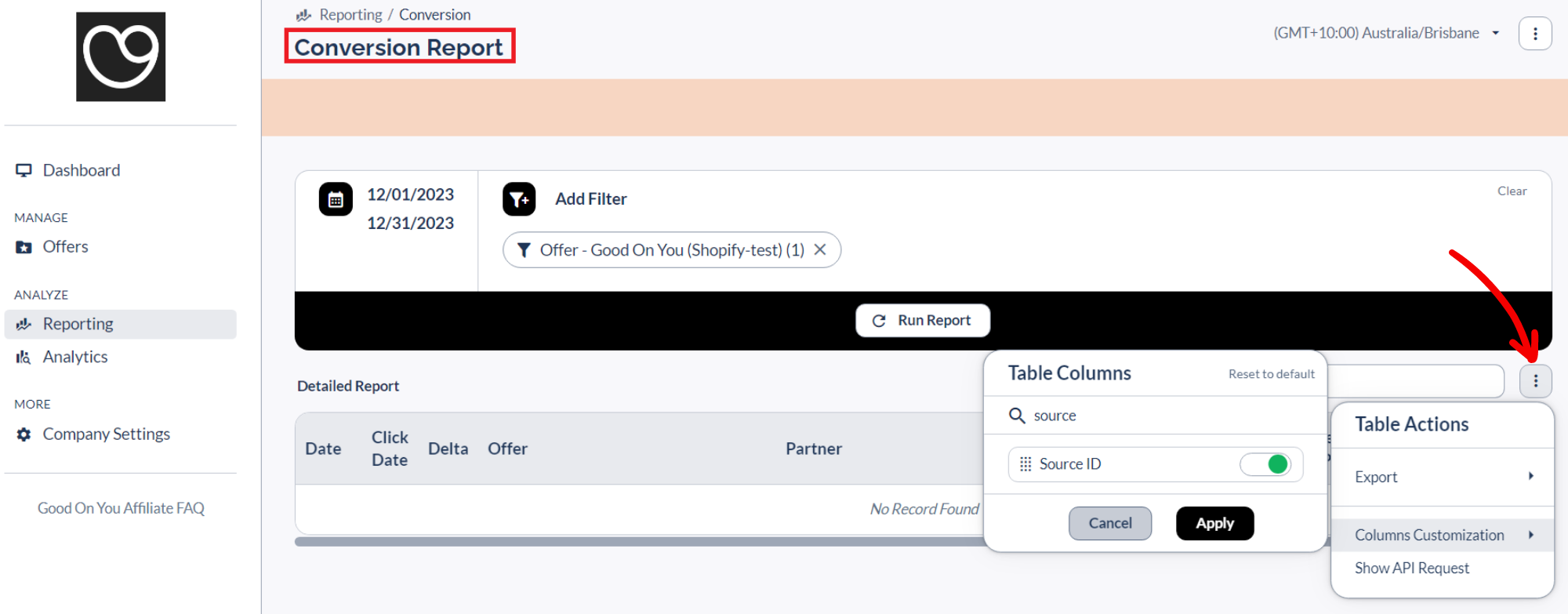
You can add the "Partner", “Source ID” and "Sub 1" fields to your Conversion and Click reports to see if clicks and conversions are coming from your brand page on Good On You’s directory, or a mention in an article, email, social media, app, or from other publishers than Good On You.

In your Conversion or Click report, go to the three-dots button and select 'Columns customization' to add these fields.  
_vtqdwhfn-62f0eeyys5fywfny8_csaAlyoqVDs1709735584692-EF-source.png

Did you find this article helpful?
Previous

I’m having issues accessing my reports

Next