

After you have submitted your updates for review, your rating goes into a queue to be completed by Good On You analysts. There are some points to note to know what to expect from submission.
Review process
1. Submit updates for review by Good On You
Once you're completed making updates, select “Submit Updates” in the main navigation. Here you’ll see the status of issues to review before submitting.
All - All issues will appear here with their status. A submission always includes all data in across issues, not just those you've updated. So you need to make sure all of the data is as complete as is possible as all of it will be reviewed and contribute to your final rating.
Not reviewed - Issues that have not been saved in the side panel saved. You will need to review and save the issue to confirm the data is accurate. That may include data that was imported from your previous rating.
Incomplete - Issues that were saved but have required questions that do not have answers.
Missing evidence - Issues that were saved with complete answers but at least one required question does not have evidence.
Reviewed - Issue has been saved and all required questions have answers and evidence
The more comprehensive information you can provide will give you your best chance to provide clarity to Good On You analysts in the review process, even if that means answering that you are taking limited or no action on certain initiatives. So the best strategy is to submit a complete data set with all issues under the "Reviewed" status.
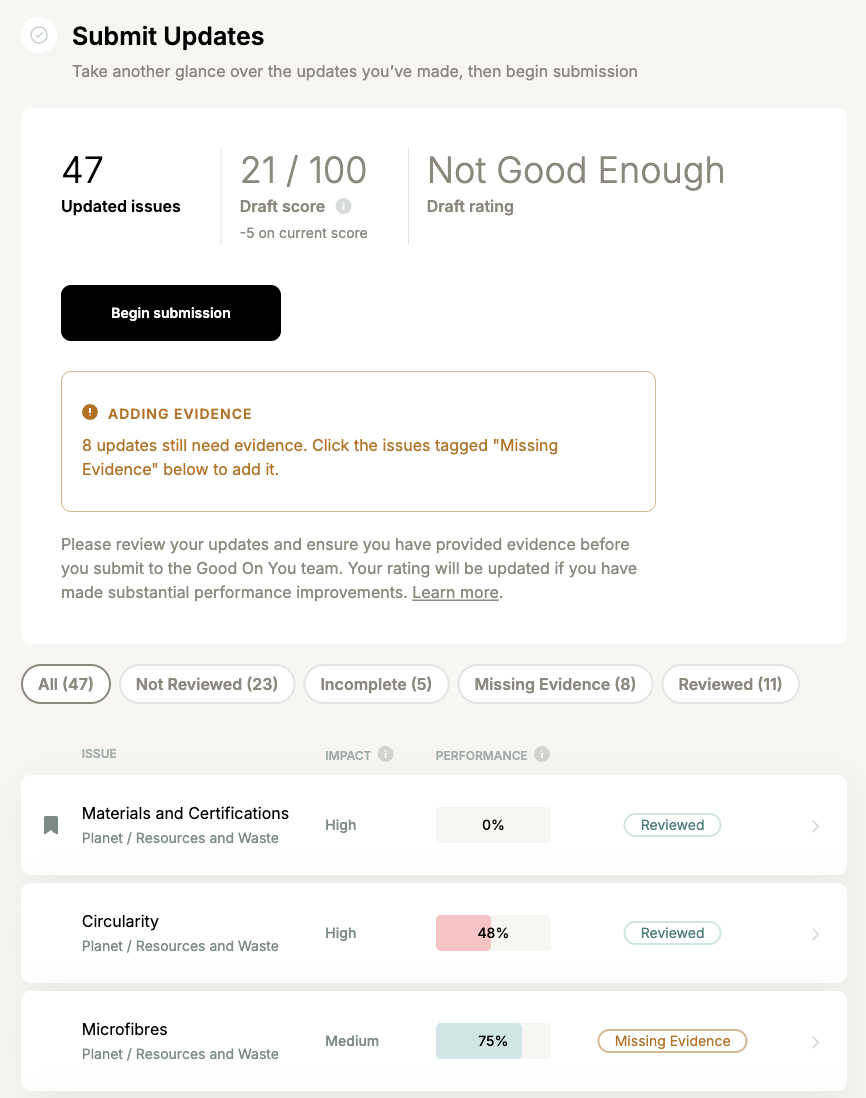
After checking over your updates and ensuring your evidence is added, click “Begin submission” where you’ll complete the submission process and submit your updates to Good On You.
2. Good On You’s rating team reviews your updates
Your updates and supporting evidence will be verified by Good On You’s expert rating team, which includes a range of subject matter experts who carefully review what you submit.
While you wait for your rating review to be completed, you won’t be able to make further updates to your rating. You can, however, continue to access other Good Measures features such as benchmarking and service providers.
If a Good On You analyst assesses that the submitted information is not meaningfully different from the current published rating, or that some other fundamental error has been made in submission, then we will contact you to resolve the issues.
3. Results delivered to your email
Once Good On You has completed its review (typically 2-6 weeks), you’ll receive an email with feedback on your updates.
If Good On You analysis considers that an update you submitted isn’t sufficiently supported by the evidence you provided, or if they can’t find the relevant information at the URL you added, they will search elsewhere for public information to complete all questions in the assessment. Your feedback email will include all of your submitted answers that were not accepted in Good On You's review, and the alternate answer and evidence that forms part of your updated score. You’ll see any such notices in the results email after your rating review is completed.
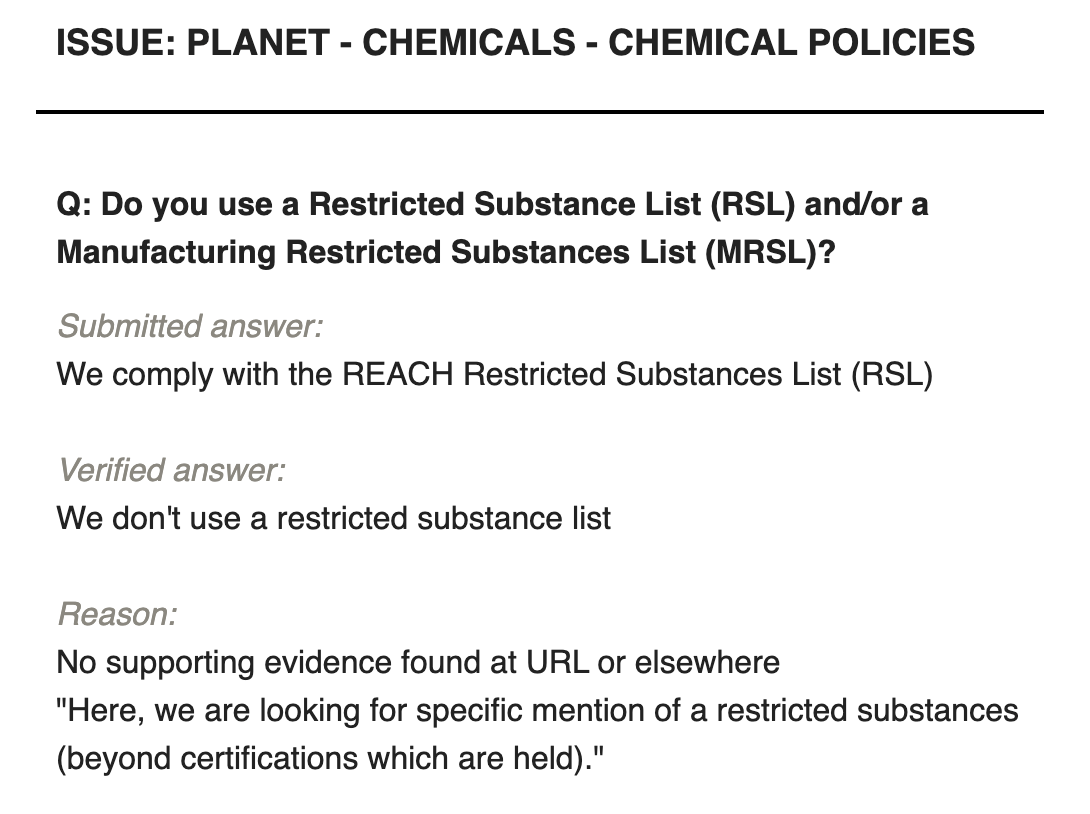
Where feedback is provided on a question where no data was submitted, the "submitted answer" and "reason" will appear as "n/a", however you will still see the answer verified by Good On You analysis.
Learn about evidence requirements
4. Your new rating goes live on Good On You
Your new rating will be published after the review is completed (typically within 4 weeks). The new rating will be published regardless of the result.
5. Continue your progress in Good Measures
When your review is completed, your new score will display as the "published score" in Good Measures. The "Update Rating" section will be unlocked to allow you to make further updates to your answers and evidence. The answer and evidence data is yours to manage - it will not be overwritten with the new rating data.
If you intend to submit again, be sure not to submit the same answers and evidence unless you have updated your disclosures in line with the review feedback. Use your feedback email to curate your data for the next submission. If you are unable to update your disclosure on a particular practice, change your answer and evidence to that which was verified in your submission review. If you're sure that the same answer should be reviewed again, make sure you update your disclosure to demonstrate the relevant initiatives specifically and tangibly. See the note below about how often you can submit.
Common questions
When and how often can I submit?
You will get the most out of the rating review if you wait until you’ve made meaningful improvements in your draft score before resubmitting. That’s why it’s important to ensure you’ve reviewed all relevant issues and added evidence to all of your updates.
If a Good On You analyst assesses that the submitted information is not meaningfully different from the current published rating, or that some other fundamental error has been made in submission, then we will contact you to resolve the issues.
To get the most out of your submission, it’s best to wait until you see your overall draft score increase by 5% or more. Check out the tips for high impact issues to focus on within “Suggestions”.
What if I submit in error?
Reach out to us at goodmeasures@goodonyou.eco and we can return your account to be able to make further updates and resubmit when you're ready.
Why was the evidence I submitted not accepted and what can I do?
After your rating review is complete, you’ll receive an email with feedback on your updates. This email will indicate what, if any, answers and evidence were not accepted.
There are several possible reasons why evidence isn’t accepted including:
Analysts couldn’t find the relevant information at the URL you provided;
Further searching yielded no other public information to support your update;
Or the information made publicly available insufficiently supported your update;
When this happens, the results email will notify you of the submitted updates that can’t be included in your score. You can use that information to plan the relevant sustainability initiatives and make updates to your disclosures in cases where the evidence you provided was not sufficient.